Pages

Showing posts with label mindmapping. Show all posts

Saturday, 23 February 2013

ExamTime and what you can do with it

Examtime is a website which is primarily meant for students to increase their learning experience and help them revise for the exams. But as I have made sure, it can successfully be used by the teachers.

Examtime has four features which you can choose from - creating mind maps, flashcards, quizzes or study goals. The site also provides a range of study tips for students.

I have already posted a mind map that I created on Examtime a while ago. It is my favourite feature of those offered by Examtime and it produces really attractive mind maps.

Today I made a set of flashcards on the topic Publications.


Each flashcard has 2 sides, the front side for the word, the back side for the definition. Students can flip and shuffle the cards, and study the words at their own pace. In my opinion, it's an activity that has to be prepared exclusively by the teacher.


Creating a multiple choice quiz was a little inconvenient because first you have to prepare the questions with answers and only then, in the next step assemble the quiz. In the end the quiz turned out well, and it looked good. After completing the quiz, students can see where they made a mistake and see the correct answer with an explanation which has to be added in the preparation process.


An option Creating a goal means that students can write their study goals as a reminder of the approaching tests or exams that helps them plan their time and stay organized.


The registration and use of the website is free and its creators have given good thought to the ways of helping students in the study process, but I have a feeling this site should have been aimed at teachers. I don't know any student who would spend hours making a set of flashcards (which means looking up each definition in the dictionary) or creating multiple choice quizzes for themselves.

I find it discouraging that there is no option of sharing an activity by URL, only by email invitations. On the other hand, I admit it gives the website owners more control of the visitors and their online behaviour.
But I can imagine a situation when a student who created a mind map would like to show it to the teacher, and the only option will be inviting the teacher to the site instead of sharing the web address which just seems more time-saving to me.

Saturday, 5 January 2013

Using mind maps with students

It seems that new mind mapping tools and software are created daily. There are so many tools that are similar in their design and performance that one may question the rationale for making more and more new applications but for the customers it means a wider choice, a possibility of finding a tool that suits your needs best.
A mind map is an indispensable learning tool for visual learners.

You can explore the vast range of mind mapping applications on my scoopit page. There you will find not only links to most mind mapping tools and software but also articles that deal with the theory behind mind mapping, tips for creating mind maps, examples and suggestions for the use of mind maps in learning.


I would like to share some of the ways how I use mind maps with my students.

One of the simplest ways how to use a mind map is gathering and sorting new vocabulary. The example shows city vocabulary organized in 3 groups. Students find it much easier to memorize the words which they see placed in a certain spot, connected to a certain topic. Works well with students of all ages.

This mind map was created with bubbl.us.


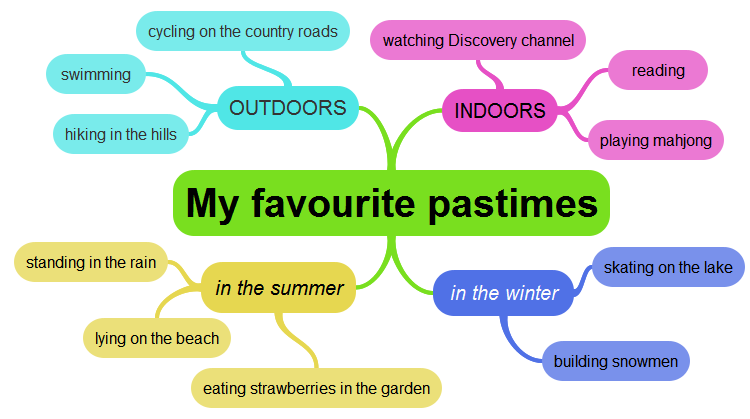
Another way of using a mind map is giving students a task where they have to display a summary of some topic, for example, My favourite pastimes. Each bubble may contain more than one word or even a phrase. This mind map can be used by the student in the classroom for making a short speech or a comment about his free time. If a mind map is created by the teacher and shown at the lesson, it can be used as a basis for classroom discussion or a writing task.

This mind map was created with ExamTime which is my new favorite.


Older students may use a mind map for outlining their report or an essay.
This mind map was created with Popplet which is a versatile application and may be used not only for mind mapping. Bubbles can be filled with text or images, arranged in various ways and even used for visual storytelling.


Useful websites for learning more about mind mapping:
  1. http://www.mindmapping.com/
  2. http://blog.iqmatrix.com/how-to-mind-map
  3. http://www.thethinkingbusiness.com/mind-mapping/mind-mapping
  4. http://blog.thinkbuzan.com/education/beginner%E2%80%99s-guide-to-the-use-of-mind-maps-in-elementary-schools
  5. http://www.novamind.com/blog/2011/articles/classroom-presentations/  

Saturday, 30 April 2011

City vocabulary mindmapped with BUBBL

I had to find an attractive way to present city vocabulary to my younger students and I remembered bubbl which I had used a while ago, then forgotten. I had not been particularly excited about it and I thought it was rather limited regarding the formatting of the mind map. I still think so. And I am disappointed that it loses its elasticity when it is embedded. But it serves well for showing the colourful word clusters on the big screen.

I have also used it with my older students and I recall they really enjoyed playing with the tool because once they put something in it, it came alive in front of their eyes. They used to drag the bubbles around and watch them spring back, and I assume it was just another toy for them. Which it certainly is.

Here is what I made for my lesson.
Link to the mind map

Monday, 21 March 2011

Mind mapping with SpicyNodes

I have been tempted to try SpicyNodes for a while and eventually I have done it.
The site offers a tool for making interactive presentations, mind maps, visualizations or organizational charts. The process of creating a map is simple and straightforward. The result is attractive and cool.

Having my students in mind, I made a very simple visual map of English tenses in the active voice. What they usually forget is the formula of each tense. Now I have put the basic rules into this map. Click on the bubbles to see what is inside.

Friday, 7 May 2010

Scribblar

As I am getting ready for the seminar in Bauska, I keep looking for attractive ways to present Web 2.0.
This is what I found a few days ago - another tool with a funny name SCRIBBLAR implying writing, drawing, scribbling etc.
This is what you can do with it (for something more exciting I have to practice a little longer...)

Tuesday, 4 May 2010

New presentation tool - Prezi

I discovered this PREZI tool for creating presentations recently and spent some time trying to make my first presentation. In my not-so-humble opinion, the result is quite viewable! Start by clicking on the arrow below, just wait till it loads.
Once it loads, you can click on Fullscreen to experience the true magic of Prezi. You can also set it to Autoplay.