Pages

Monday, 14 May 2012

Post on the web right away

One day you may experience a situation when you need to post something on the web fast (but not necessarily furious :)) and you don't want to use your blog for this purpose. What can you do? Use one of the numerous web services which promise to publish your article immediately.

I have already written about such sites before but it seems that they keep mushrooming in steady rows and we get new possibilities offered again and again. I have used some of them and there are moments when they are really convenient and helpful.


Now you can post a single picture on the web and get a unique URL to send it to whoever you want. Think of the possibilities it gives us - good and not so good...
Clipica just asks you to copy and paste (Ctrl + V) your picture and there you go, the link it ready.


Snaggy works in exactly the same way and you can also crop or annotate the image once it is uploaded - useful!


wePaste is an internet clipboard for your text. Give a name to your page, write the text and publish it. You can create a password for the page and set the date when the page will expire.


Qacker gives you a blank page which you can fill with your text or images and post on the web.


 Textsave is a blank space for writing your text and posting online. The tool is really basic but it can serve well if a student needs to send in an essay or write a draft for a project.


Loose Leaves - a place where to write and publish your thoughts. If you don't have your own blog, you can post your message and share it on Twitter or Facebook.


Justpaste.it  is a great way to publish your text or images without much trouble. It also has HTML editor and you can export your page to PDF.


Checkthis is a great instant webpage which lets you add your text, images, videos, links, polls and share it online. 


All the websites mentioned above don't require sign up and you can create your page anonymously. And, it goes without saying, they are all free.


Thursday, 3 May 2012

How to make your Scoop.it work

I have been asked several times to share my experience about curating the content on the Scoop.it site.

I am pleased to see that my Digital Presentations in Education keeps gaining popularity, the number of visitors is growing daily and the magic score which measures the topic quality has reached 91 (out of 100).

I have been curating my topic for about 10 months and I have mulled over the principles that I stick to in curating my topic. They are simple and they are proven.


1. Pick a topic that is relatively narrow so that you can focus on one theme (instead of gathering a wide range of links and eventually going off on a tangent). This will attract the right audience who have true interest in your topic.

2. Pick a topic which you are familiar with and, better still, where you have some knowledge and experience because you will need to evaluate the resources you are going to scoop.

3. Be very picky! Don't scoop everything the sources offer, select only the most relevant articles or posts which will add new value to your collection.

4. Be consistent. Keep to the topic you have chosen, don't go astray when you see a new, fantastic tool or resource which is a gem but does not match your theme.

5. Scoop regularly. (Perhaps this is the hardest part.) New information gets stale in a day. Try to find all the new tools/ resources/ information/ reviews etc. pertaining to your topic that have been published on that day. It's no use scooping very old information except if it is extremely worthwhile and you wish to save it on your site.

6.  Check and double check how reliable and valid is the source you are going to link to your site. Verify the authenticity of the website. Out there I have seen so many fake websites which post stolen materials and disappear in a day or a week.

7. I have seen some curators write their own reviews of the tools or technologies they scoop but I have neither time nor skill to do it, and I believe the developers or professionals have said everything that has been worth saying on the webpage I am scooping.


My Scoop.it page is obviously useful not only to my visitors but also to myself. I return to it every time I need to prepare a new presentation or suggest a new tool to my students.
   

Sunday, 15 April 2012

Recommend a book for me

I am a person who reads in the morning while having my morning coffee, at lunch while eating my soup, in the afternoon while grading student homework, in the evening with a hockey game on TV (my husband's choice) in the background, at night when all the world around has fallen asleep... I'd also read at the lessons but I know it is impossible, unfortunately.

I am an omnivore. I read everything. But I have my preferences.

The books you see in the picture have been taken from the shelf randomly, not because they are my favourites, although I loved these too.

I read travel books and crime stories, I read memoirs and biographies, I read psychological thrillers and children's books, I read drama, romance and love stories, I read action and adventure books, I read cookbooks and gardening books, and of course I read books on methodology and didactics.

For me, a good book should open up a new world (like Elif Shafak's The Bastard of Istanbul), make me fall about laughing (like Bill Bryson's Neither Here Nor There), shock me (like Kate Long's The Daughter Game), surprise me (like Audrey Niffenegger's The Time Traveler's Wife), shake me (like Anita Shreve's Testimony), entertain me (like Jo Nesbo Nemesis),  terrify me (like James Rollins' Amazonia) and soothe me (like Maeve Binchy's Evening Class).

I'd like you to suggest a book for me which I could read next. I have been given great recommendations before (like Elif Shafak's book suggested by someone on Twitter - I am hugely grateful for it), and this is the time when I ask you, my readers. I am curious and I am impatient to make new discoveries in my world of written word.

Wednesday, 11 April 2012

EFL In The Information Age

Guest post by Sofia Rasmussen.
  
Sofia is a graduate student in journalism who writes for blogs and newspapers around the world in her free time. Her primary interests are science and education. When she's not reading or writing, Sofia enjoys traveling, hiking, and cycling.

Classrooms around the world are becoming much more accepting of different types of technologies as the educational potential of different systems improves daily. As educators in English as a Foreign Language, or EFL, classes are discovering how technology can be used to disseminate information more quickly, expedite the process of gaining fluency, and even improve a student’s desire to study independently.

Industry organizations for EFL and related disciplines are working hard to spread the word about technology use and increase access to those tools. The global education association
TESOL, or Teachers of English to Speakers of Other Languages, reports that there will be at least five EFL, TESOL or ESL conferences during 2012 that focus mainly on the use of technology in EFL classrooms. Accreditation programs around the world, including traditional master's and online doctoral programs in ESL/EFL, are re-molding their curricula in order to ensure that new teachers are teaching students how to harness the power of chat programs like Skype and online vocabulary flashcard sites.

Workshops & Seminars


Some organizations use communicative technologies, such as the Internet, to increase access to workshops, seminars and other educational opportunities regarding EFL. For instance, TEFL Tech, a Britain-based company, develops workshops for EFL educators that inform teachers about new technology advances in EFL and ESL teaching. TEFL Tech also offers consultancy services to educators who are interested in purchasing computers, software or other technical equipment for EFL classes.


E-books


Teachers of English as a foreign language also benefit from the use of ebooks in the classroom. An article published by Language Magazine reports that EFL students introduced to a wide selection of ebook material are more likely to engage in independent reading, reinforcing the lessons learned in the classroom. Rich text applications that feature illustrations and additional content about authors can also encourage independent reading among EFL students with access to ebooks. eBook content currently available on the market runs the gamut from classic literature to basic instructional communication. The variety of content and the ease of downloading new materials make ebooks a valuable addition to the EFL curriculum.


Devices


Hardware devices are becoming smaller, encouraging hand-held use as well as the ability to keep technology with the student instead of tying the student to a computer station. The use of handheld tablets and technological devices among students is becoming more acceptable in educational settings. An April 2012 story published by
The Greenville News talks about the use of smart tablets and related devices by elementary school students near Greenville, S.C., for English language instruction and other subjects.

The use of educational technologies like tablets and other smart devices can be enhanced through learning management systems, also known as LMS. An LMS can be used to store lesson plans and group activities online for access by students while away from the classroom. EFL classrooms utilizing an LMS can store English educational videos and other types of English language learning content for students.


Blogging


Writing in the English language helps to cement the lessons learned in class by English as a foreign language students. Many blogging services offer free blogs that EFL students can publish their work to. This also allows for teacher feedback as EFL educators can read these blogs and offer constructive criticism on the student’s use of the English language.
 

Sunday, 1 April 2012

Using pictures in language classes

Everyone knows that a picture is worth a thousand words, a phrase attributed to Napoleon Bonaparte although other sources say it has originated in ancient China. Be as it may, teachers use pictures in the classroom very often and with good reason. 

Pictures stimulate thinking, encourage creativity, boost learners' confidence, appeal to visual students.

Take for instance pictures of babies. The internet abounds in them, and you can find numerous images having their own story behind. Here I made a collage of extremely eloquent baby pictures. These images may be used for speaking about human emotions. Students would find it easier to identify themselves with a baby rather than an adult, recognizing familiar emotions easily.
Students can write a caption for each picture or they can simply name emotions/ feelings displayed by a baby in each picture.


Another win-win object in pictures perfect for speaking practice is an animal. As popular as the pictures of babies, and possibly even more favoured, are images of different animals caught in various situations. Animal "faces" are no less expressive than human faces. 

Students can devise a story based on the moment caught in the picture, or they can combine several pictures to use in one story. They can write an allegory where animals represent humans. Again, the pictures are fantastic for describing emotions, feelings, attitude.


 More resources:

Excellent ideas and tips on The eltpics ideas site for teachers Take a photo and... 
Picture This: 5 Unique Ways to Practice Grammar Using Pictures 
Picture Projects for Visual Learners
On Twitter follow the hashtag #eltpics.

Thursday, 22 March 2012

Put your story on the cube

When I learned about CubeCreator from the readwritethink website, I thought it might easily be used with students to make the tedious learning process more attractive.


Students can make three types of pre-designed cubes and the fourth possibility is to make their own cube.

For their first cube my students had to use the BioCube template to create the biography of a famous athlete. As you can see, they produced great cubes and enjoyed themselves in the process.

The next cube they are going to create will be MysteryCube. As for the mysteries - it's up to my students.


Friday, 9 March 2012

Student presentations in the classroom

I widely use presentations in the classroom, created both by me and my students. While PowerPoint is still the most popular tool among students, new tools and applications are getting used more and more often.

Today I had a lesson with my 18 year old students who had to prepare a presentation about a personality in the computer world.  For those who use Solutions by Oxford University Press, I can add that it was a lesson in Unit 8 about the biographies of remarkable internet personalities.

One of the tools that was used for creating the presentations was present.me. Those students who used the tool claimed that it was really easy to use but they were a little flustered by having to wait for the PowerPoint slides to be processed. For some of them it took long hours. They also realised that it matters very much what kind of a microphone you have - the in-built laptop mikes produce worse sound than the portable ones.

On the whole, they loved working with present.me because it was a more challenging tool than the ones they had been using so far and it produced more impressive and gratifying results than other tools.

Take a look at the presentation made by my student Monta.


Another tool that has gained popularity among my students is Prezi.

Below is the presentation made by Renate about one of the leading figures in the Latvian social networking world Lauris Liberts who has created frype.com. The presentation was accompanied by well-prepared oral comments which unfortunately you cannot see nor hear.


Friday, 24 February 2012

What can you do with MentorMob?

MentorMob is a fresh web service for creating a series of related websites on any topic one may fancy. It is a form of content curation done by assembling a list of web links on one topic. They are arranged in a playlist which can be viewed step by step or by going straight to the chosen website. It is easy to use and available for free.

MentorMob is a very convenient tool to the teachers who want to compile a list of useful links for their students. It may be a collection of tutorials, grammar quizzes, reading or video resources, blog articles - practically anything that can be found on the web. MentorMob can be effortlessly used by students for putting together a list of their favourite game or video sites or collecting useful webpages for doing the research paper.

To illustrate what the playlist looks like, you can see my compilation of websites with audio files and listening tasks - The Best Websites for Developing Listening Skills.


Create your own Playlist on MentorMob!

Here are two more playlists by me:
The Best Websites for Teaching Writing
The Best Websites for Grammar Activities

Last but not least is the colour of the website which is my favourite - green. Lettuce-green, lime-green, lawn-green, olive-green, mint-green, spring-green, sea-green? I love them all and it was inevitable that I'd be attracted to MentorMob!

Sunday, 5 February 2012

SideVibe - a website that helps you teach paperless


I learned about SideVibe website from my Twitter PLN (@lelapin). It attracted my attention immediately both by its appearance and fantastic usability. You have to download its toolbar and then you can start using it for practically every web page that you think can be applied in your classes.

SideVibe is a web based teaching tool which replaces the old-fashioned handouts by putting the worksheet on your screen. Neither you nor your students need to print anything because all the learning, testing and homeworking can be done online. The worksheets or task sheets are created by the teacher and they are attached to the web page you choose for your students to explore or read. The teacher can choose from the three types of activity vibes or a discussion vibe.
The students register with the teacher's code (provided by the site) and are automatically listed in the teacher's account. After the students do the task, you assess their work online and send them feedback - without printing a single strip of paper.

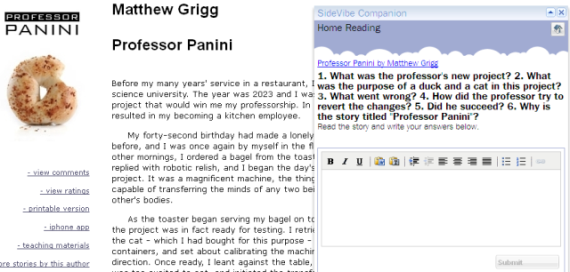
To test the website I chose my favourite site East of the Web / short stories section and prepared a simple assignment for my students about one of the short stories - Professor Panini, a witty story about dramatic mishaps taking place in 2023. The students were asked to do it as home reading task. I have not seen the results yet.


 The assignment is written by the teacher on the "vibe" which can be dragged around the page to any place which is convenient for viewing. Thus if the page is long and stretches far down the screen, the vibe is taken along and you don't have to scroll up and down to access it. Students write straight in the answer box without the need of opening a Word document or a notebook. After they submit it, the teacher can assess it and send feedback.


Thursday, 2 February 2012

Creating Presentations on Digital Devices

http://www.flickr.com/photos/yggg/2141154996/

This is a guest post by Marina Salsbury who has written articles for my blog before here and here.

* * * * * * * * *

Presentations play a big role in the business world today. Effective presentations are able to convey a rich amount of information to a large audience in a cohesive manner. In order to be able to put together a proper presentation, designers need to be able to utilize strong applications that cater towards specifically creating organized and professional presentations that can be relied on to convey information properly and effectively. According to MBA Online, branding is a highly psychological and literary arena. Presentations are great ways to use images and animations to appeal to an audience's emotions. Applications provided on different platforms allow for the most astute and professional presentations to be put together and organized for a professional setting and thus serve as an integral job in their position within the business world and other settings requiring presentations.

Some of the most new and innovative applications can be found on tablet devices (specifically the iPad). One of the most useful and most popular applications that is used on a regular basis to prepare presentations for projects is Keynote. Keynote is a presentation program that can be found on Apple computers and has been thoroughly reworked to operate on the Apple iPad. Keynote is a wonderful program for creating slide based presentations that can be presented to an audience in a stylish and engaging manner. One of its biggest advantages is that it seamlessly syncs between all of your iOS devices. You can develop a presentation on your MacBook, make quick edits right before your presentation on your iPad, and simply plug your iPhone in to give the presentation. It provides a very visual an engaging approach towards presenting and is a great way for engaging audience on a much more visual stimulating level.

Much like the previously mentioned Keynote, Powerpoint is a great visual presentation program that allows people to organize visually stimulating presentations. Powerpoint allows for presentations to be created that are infused with graphs and photos that support whatever idea or information is being demonstrated. Powerpoint is part of Microsoft Office and is infused with a great amount of features such as animation and the ability to import spreadsheet files to represent data in the form of a graph. Powerpoint is perhaps one of the most user friendly presentation programs and is widely accepted as the norm in professional and educational environments. Regardless of the product integration of Keynote, Powerpoint remains the most used presentation program in the world.

Flipping Book is an alternative presentation program that can be used on a plethora of devices. Not only does Flipping book allow you to import industry-standard formats into presentations (PDF and MS Office files), it's truly a cross-platform app by allowing you to use it on your computer, iOS, and Android devices. Flipping book simulates the literal flipping of pages in a book to allow for a more exciting presentation of material and information. Created to help fulfill marketing ideas, flipping book allows presenters to show data in a fresh and fervent manner. Flipping Book creates a more user friendly system created by engineers who were looking to find a professional and fun way to prevent material.

It is important when putting together a presentation to try and look as professional as possible. Fortunately these applications allow users to create innovative and engaging pieces of material that will engage an audience and convey material and statistics to a high degree. It is essential to be able to organize information in such a way that is conducive to a setting in which it can be properly presented. Presentations are a way in which presenters are able to convince and win over audiences, by displaying a wide range of information. It is important that only the best technology is used when conveying ideas to an audience so as to leave the best impression possible.

What is your favourite presentation tool?